


Church Calendar Software: Free Options and 2026 Prices
Compare church calendar software for room booking and a public calendar: Planning Center Calendar, Google Calendar and Teamup, with 2026 prices.
What changed on October 23, 2026: Replaced the calendar recommendations, kept the published feature and price comparisons, added Covenant OS at its published price, priced Covenant OS at the 101 to 300 people band, and restored room bookings, room requests and conflict checks.
Short answer
A church of 100 to 300 people can run its calendar free. Google Calendar is free for a public calendar with no room booking, and Teamup is free for five sub-calendars. Planning Center Calendar is free for unlimited events and one managed room, and $15 a month books five rooms. Covenant OS (ours) puts events, sign-ups and attendance beside the people and the giving, from $39 a month. Choose by how many rooms you book, then name one person who owns the calendar.
- Google Calendar for a public calendar, and Teamup for five sub-calendars
- Free
- Planning Center Calendar with five managed rooms
- $15 a month
- Covenant OS (ours), with events, sign-ups and attendance in one plan
- $39 a month
Every price here was read off the vendor's own page on October 22, 2026.
On this page
- What is the best church calendar software?
- How much does church calendar software cost?
- How many rooms does a church calendar need to book?
- How do I create a church calendar?
- What goes on a church calendar?
- How do I make a Google Calendar public for a church?
- How can I print a church calendar for free?
- What should a church ask before choosing calendar software?
- Questions people ask
A church calendar holds every service, meeting and room booking, with a date, a time and a place, so the staff, the volunteers and the congregation plan from the same week. The examples below use Riverside Community Church in Cedar Falls, Iowa, a sample church with five rooms and one part-time administrator.
What is the best church calendar software?
Consider Covenant OS for a church that wants events, sign-ups and attendance beside its people and giving, from $39 a month. It includes a church calendar with room bookings, room requests and conflict checks. Google Calendar for a church that needs a free public calendar and books rooms by hand, and Teamup for a church that wants color-coded calendars without a church system.
| Planning Center Calendar | Google Calendar | Teamup | |
|---|---|---|---|
| Free plan | Unlimited events, one managed room | Free with a Google account | Five sub-calendars, five users |
| Paid plans | $15 a month for 5 rooms, up to $179 for 75 | None needed for the calendar | Plus $12 a month yearly, Pro $30 |
| Room booking with conflict management (as Planning Center lists it) | Yes | No | No |
| Event request forms | Yes, for staff and members | No | No |
| Public calendar for guests | Church Center, website embed, iCal feed | Public link and embed | Shareable links |
| Calendar setup | Connects to Planning Center | A Google account | Color-coded layers |
Prices read on planningcenter.com/calendar and teamup.com/pricing on October 22, 2026. Teamup prices are per master calendar.
A managed room is one the calendar books and tracks, and Planning Center lists managing scheduling conflicts among its calendar features. A sub-calendar in Teamup is one color-coded layer, such as youth, music or facilities.
How much does church calendar software cost?
Nothing, for most churches of this size. A church that books five rooms in Planning Center pays $180 a year, and Teamup Plus costs $144 a year billed yearly. A church that wants its events and sign-ups inside its church software pays $1,190 a year at the yearly rate, $119 a month, for a church of 101 to 300 people, which buys the whole church management system.
Planning Center prices its calendar by rooms alone. Its page says the calendar “is completely free to create unlimited events, manage resources, and add admins,” and the tiers run 5 rooms for $15 a month, 15 for $32, 30 for $69, 50 for $115 and 75 for $179.
How many rooms does a church calendar need to book?
Count every space two groups could want at the same hour. Riverside books five, so it sits on Planning Center’s $15 tier.
| Room | Who asks for it | A typical clash |
|---|---|---|
| Sanctuary | Worship, weddings, funerals, the choir | A wedding rehearsal on the evening of a funeral visitation |
| Fellowship hall | Dinners, outside groups, Vacation Bible School | A Saturday work day lunch and a baby shower |
| Kitchen | Every meal and the funeral lunch | Two meals booked by two ministries |
| Youth room | Wednesday youth group, small groups | A Wednesday small group moved from a home |
| Room 10 | Membership class, the elders, counseling | The elders and a membership class on one Sunday |
Book the room when the event goes on the calendar, so the administrator sees a clash before a second group plans around that hour.
How do I create a church calendar?
Name one owner, then send every event through that person. The owner checks the room, books it, publishes the event and puts it in the printed month.
- The request Fall dinnerSat Nov 7 The hospitality team fills in the event form: name, date, start and end, room, the person in charge, and whether the public may come.
- The room check Fellowship hallKitchen The administrator checks both rooms for that evening and the setup hour before.
- Booked 5:00 to 8:30 PM The rooms go on the calendar for that evening, so the next request for them shows the booking.
- Published Church CenterWebsite Public events go to the church app and the website; setup stays on the staff calendar.
- Printed Bulletin, Oct 25 The November month prints in the bulletin on the last Sunday of October.
Church Posting’s church management software, from $39 a month by church size

Covenant OS
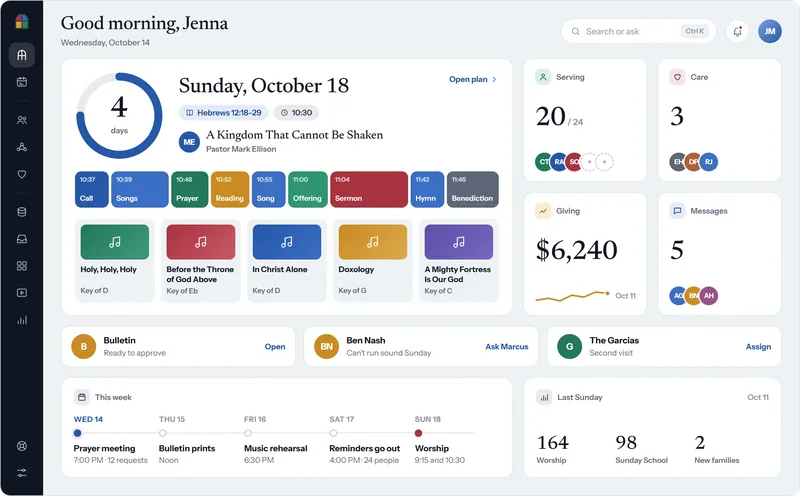
The Sunday plan, the serving roster, giving and messages sit on one screen, and the week of events runs along the bottom. The church plan covers events, attendance, sign-ups and registrations.
The Today screen in Covenant OS for a sample church, with Sunday’s order of service and the week’s calendar from the Wednesday prayer meeting to Sunday worship.
See Covenant OSFive rules keep the calendar trusted.
- Name one person who adds, changes and removes events, usually the church secretary or administrator.
- Ask for every event in writing, with its name, date, start and end time, room, the person in charge, and whether the public may come.
- Book the room when the event goes on the calendar.
- Enter services and weekly meetings as repeating events, and check them every January.
- Keep one public calendar for the congregation and one staff calendar for private meetings and room setup.
What goes on a church calendar?
Services, weekly meetings, church events, leaders’ meetings, room bookings and staff deadlines. The first three are public, and the last three usually stay on the staff calendar.
| Kind | Examples | Who sees it |
|---|---|---|
| Services | Sunday morning, Sunday evening, the Lord’s Supper, Christmas Eve | Everyone |
| Weekly meetings | Bible study, prayer meeting, youth group | Everyone |
| Church events | The fall dinner, a work day, Vacation Bible School | Everyone |
| Leaders’ meetings | The elders, the deacons, the finance committee | Staff, or everyone if your church publishes them |
| Room bookings | A wedding rehearsal, a funeral, an outside group using the hall | Staff |
| Deadlines | The bulletin, the newsletter, the budget | Staff |
Free app from Church Posting
cOS Events
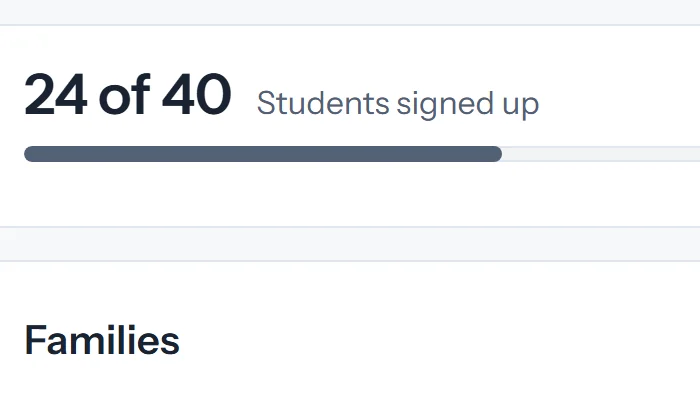
cOS Events gives an event like the fall dinner its own page, where people register on their phones and get a ticket with a QR code for the door.
See cOS EventsHow do I make a Google Calendar public for a church?
Open the calendar’s settings and turn on public access for its events. A calendar on a Google Workspace account can be shared only if the administrator allows it, so check that before you publish.
- Google Calendar
- My calendars
- Settings and sharing
Access permissions for events
- Make available to public On
- Access level Guests need the time and the room See all event details
Steps from Google's help page on sharing a calendar, read October 22, 2026. Keep private meetings on a second calendar that stays unshared.
Free app from Church Posting
cOS Websites
cOS Websites gives the church a website on its own domain with service times, a Plan a Visit page and events, so guests find the week beside the service times.
See cOS WebsitesHow can I print a church calendar for free?
Print one month on one page, with the services on the same lines each week, and put it in the bulletin on the last Sunday of the month before.
November 2026
- Sun 1, 9:15 Sunday school. 10:30 worship, sanctuary.
- Wed 4, 6:30 Bible study, fellowship hall
- Sat 7, 8:00 to noon, work day, meet at the front doors. 5:00 fall dinner, fellowship hall.
- Sun 8, 10:30 worship
- Wed 11, 6:30 Bible study, fellowship hall
- Sun 15, 6:00 PM members’ meeting, sanctuary
- Sat 21, 9:00 to noon, membership class, room 10
- Thu 26, Thanksgiving. Office closed.
- Sun 29, First Sunday of Advent, 10:30 worship
Free tool from Church Posting
Church bulletin maker
Type the month’s events into the bulletin maker’s announcements and print the folded bulletin for the last Sunday of the month.
Make a bulletinThe dates that move each year are the ones a church gets wrong. Pick a year in the free tool to see Ash Wednesday, Easter, Pentecost and Advent, and print the whole year with your church’s name on it.
Free tool you can try here
See the church year dates
Pick a year and the dates that move each year appear. The real tool prints the whole year and gives you a file for your calendar.
This free tool is made by Church Posting.
Riverside Community Church · 2027
The tool is free and opens with the year and church name you chose.
What should a church ask before choosing calendar software?
Five questions decide it. Ask each one in a free trial before you move a single event.
| Question | Why it matters |
|---|---|
| Does it show room conflicts before you book? | Two groups in one room leaves one of them in the parking lot |
| Can a guest see public events without signing in? | A visitor looking for a service time will not make an account |
| Can staff keep private events hidden? | Counseling and personnel meetings stay off the public page |
| Can it sit on the church website? | Guests find the events beside the service times |
| Can you export every event? | You keep your history when you change software |
Questions people ask
What is the best calendar app for churches?
For a church that wants events, sign-ups and attendance in the same system as its people and giving, consider Covenant OS (ours), from $39 a month. It includes a church calendar with room bookings, room requests and conflict checks. For a church on no church software, Google Calendar is free and good enough for a public calendar, and Teamup adds color-coded sub-calendars without a church system.
Is there a free church calendar app?
Yes. Church Posting's free church year calendar tool prints a year with your church's name on it, Google Calendar is free, and Teamup has a free plan with five sub-calendars and five users (each read October 22, 2026). Planning Center Calendar is free for unlimited events and one managed room, and $15 a month books five rooms.
Is the Church Center app free?
Church Center comes with every Planning Center subscription at no extra cost, and its essentials are free. Planning Center sells Church Center Plus at $15 a month for custom themes and pages, and it does not offer a church-branded icon in the app stores.
How do I make a church calendar public?
In Planning Center, publish the event to Church Center or embed the calendar on your website. In Google Calendar, open Settings and sharing for the calendar, choose Access permissions for events and turn on Make available to public. A calendar on a Google Workspace account can be shared only if your administrator allows it.
How can I print a church calendar for free?
Use the free church year calendar tool on Church Posting to print the year with your church’s name, or download the monthly worksheet below and fill in your own events. Put the printed month in the bulletin on the last Sunday of the month before.
Who should own the church calendar?
One person, usually the church secretary or administrator. Every event request goes to that person, who checks the room, books it and publishes the event, so the calendar never holds two versions of the same Sunday.
Sources
- Planning Center Calendar, Planning Center. Read October 22, 2026.
- Church Center, Planning Center. Read October 22, 2026.
- Teamup Subscription Plans and Pricing, Teamup. Read October 22, 2026.
- Share your calendar with someone, Google. Read October 22, 2026.
- Covenant OS Pricing, Covenant OS. Read October 23, 2026.
Church Administrator jobs
Churches have open church administrator jobs on Church Posting , including St. Charles Campus Coordinator at Element Church and Campus Administrator at The Crossing .
More on software
All software articlesChurch payroll software, priced, and how each one handles a minister's housing allowance
How a minister's housing allowance works under IRS Publication 517: the three limits on it, the designation a church makes in advance, Social Security and Medicare tax, and the pastor's W-2.
QuickBooks for Churches: Setup, Funds and 2026 Prices
Set up QuickBooks Online for a church: which plan tracks funds, the $80 TechSoup price, class setup and a free chart of accounts to import.
Church accounting software that keeps each fund separate, with 2026 prices
What fund accounting is, prices read October 22, 2026 for Aplos, ChurchPro, PowerChurch, ChurchTrac, IconCMO, QuickBooks Online, Wave and Xero, and the IRS rules a church treasurer has to meet.
The weekly email
New free tools, guides and jobs, in one email on Sundays.