


Church Live Streaming Setup: Three Equipment Plans
Stream a church service with a phone, one camera or two: the equipment and prices for each, the sound feed, YouTube settings and the CCLI license.
What changed on October 22, 2026: Rewrote the guide with equipment at three budgets, sound and upload speed, OBS settings for YouTube, streaming services priced on October 22, and the music license rules.
Short answer
Start with one camera, a capture device and the free OBS Studio on a computer the church already owns, and stream to YouTube at no charge. The camera and capture device cost $1,448.99 at prices read October 22, 2026. Take the sound from the sound board through a cable, have an upload speed of twice the stream's rate, and add CCLI's Streaming License before you stream songs under copyright.
- YouTube and OBS Studio, the platform and the streaming software
- $0
- One PTZ camera and an HDMI capture device, read October 22, 2026
- $1,449
- Upload speed for a 720p stream at YouTube’s recommended rate, with room to spare
- 16 Mbps
Every price here was read off the vendor's own page on October 22, 2026.
On this page
- What equipment does a church need to live stream?
- How does the stream get from the sanctuary to YouTube?
- How do I get good sound on a church live stream?
- How much upload speed does a church live stream need?
- What OBS settings should a church use for YouTube?
- Where should a church stream its service?
- Does a church need a license to stream its service?
- What should stay off a church live stream?
- Who runs the stream when the volunteer is away?
- Questions people ask
A church can stream its service with a phone, with one camera and a computer, or with two cameras and a switcher. Every setup takes its sound from the sound board, the desk that mixes the church’s microphones. The examples below use Riverside Community Church in Cedar Falls, Iowa, a sample church of about 200 people with one volunteer on the stream each Sunday.
What equipment does a church need to live stream?
A church needs a camera, a sound feed from the sound board and a way to send the picture to the internet. Most churches of 100 to 300 people start with one remote-controlled camera, a capture device and a computer they already own.
| A phone | One camera and a computer Most churches | Two cameras and a switcher | |
|---|---|---|---|
| Camera | A phone the church owns, on a tripod | PTZOptics Move SE 20x, $1,349 | Two PTZOptics Move SE 20x, $2,698 |
| Gets the picture online | The YouTube app | Elgato Cam Link 4K, $99.99, into OBS Studio, $0 | Blackmagic ATEM Mini Pro, $445, streams with no computer |
| Sound | An audio adapter from the sound board | A cable from the sound board | A cable from the sound board into the switcher |
| New equipment | A tripod and an adapter | $1,448.99 | $3,143 |
| People to run it | One | One | Two |
Prices read 22 October 2026: the camera on Markertek (list $1,489), the Cam Link 4K on elgato.com and the ATEM Mini Pro on blackmagicdesign.com. Cables, mounts and the computer are not counted.
A PTZ camera pans, tilts and zooms from a remote or from the computer, so one volunteer can move from the pulpit to the choir without leaving the desk. A capture device is a small box that brings the camera’s HDMI picture into the computer over USB, where streaming software sees it as a webcam. The ATEM Mini Pro switches between four HDMI inputs and sends the stream to YouTube over its Ethernet port with no computer.
The reach table tells you how much zoom the camera needs from where it will sit. Measure from the camera spot to the front of the platform, then read across to the width of the shot you want.
How does the stream get from the sanctuary to YouTube?
The picture and the sound meet in an encoder, which is streaming software on a computer or a box such as the ATEM Mini Pro. The encoder sends one stream up the church’s internet connection to YouTube or a paid service.
- Camera HDMI One PTZ camera on the back wall, aimed at the pulpit.
- Sound board Aux output Its own mix for the stream, plus a microphone on the congregation.
- Encoder OBS Studio The capture device brings the picture in; the sound board cable brings the sound.
- Internet 8 Mbps A 720p stream going up a cabled connection.
- YouTube Church channel Members watch live or later, and a link goes in the Sunday email.
If the stream stutters, the third and fourth steps are the usual cause. Plug the computer into the network by a cable and lower the bitrate.
The song words on the stream come from a presenter program. cOS Presenter, Church Posting’s free presenter app, runs the words on the projector, the singers’ stage screen and the stream from one operator screen. Press Next to see how the slides move.
Free tool you can try here
Run the slides from one screen
This is how cOS Presenter works. Press Next and the song moves one slide at a time while you see what comes after.
This free tool is made by Church Posting.
Holy, Holy, Holy, verse 1 and 2
Slide 1 of 8
cOS Presenter is a free app from Church Posting.
How do I get good sound on a church live stream?
Take the sound from the sound board through a cable, never from the camera’s own microphone. Give the stream its own mix, because a room mix sounds thin and quiet at home.
- Run a cable from the sound board to the phone adapter, the computer or the switcher. A phone or camera microphone picks up the echo of the room.
- Ask the person who runs sound for a separate output for the stream, with its own level for each microphone. On many sound boards this is called an aux output.
- Add one microphone that points at the congregation, so people at home hear the singing. Send it to the stream only, and keep it out of the room’s speakers, where it would cause feedback.
- Listen to the stream itself through headphones during rehearsal, and fix what you hear before the service starts.
How much upload speed does a church live stream need?
Have twice the stream’s rate. YouTube recommends 8 Mbps for a 720p stream and 14 Mbps for 1080p, so plan for an upload speed of at least 16 Mbps or 28 Mbps.
| Picture | Minimum rate | Recommended rate | Upload speed to have |
|---|---|---|---|
| 720p at 30 frames a second | 3 Mbps | 8 Mbps | 16 Mbps |
| 1080p at 30 frames a second | 5 Mbps | 14 Mbps | 28 Mbps |
Rates from YouTube’s encoder settings page, read 22 October 2026. The last column is our advice, twice the recommended rate, because everything else in the building shares the connection.
Upload speed is how fast your connection sends, measured in megabits per second (Mbps). Test it at the spot where the streaming computer sits, on a Sunday morning, with the computer on a network cable. If the test shows less than 16 Mbps, stream 720p at a lower rate that stays under half of what the test showed. A connection under 6 Mbps cannot carry 720p at YouTube’s minimum with that margin, so ask your internet company for a faster upload before you stream.
What OBS settings should a church use for YouTube?
Stream 720p at 30 frames a second with a constant bitrate of 8,000 Kbps, AAC audio at 128 Kbps and a keyframe every 2 seconds. Those are YouTube’s own recommendations, and they suit most church connections.
| Choose | YouTube’s guidance | |
|---|---|---|
| How the stream reaches YouTube | YouTube over RTMPS | YouTube recommends RTMPS |
| Rate Control, on the Output tab | CBR, a constant bitrate | YouTube asks for CBR |
| Video rate | 8,000 Kbps | 14,000 Kbps for 1080p |
| How often a full frame is sent | Every 2 seconds | Never more than 4 seconds |
| Sound | AAC at 128 Kbps, stereo | 128 Kbps for stereo |
| Picture size | 1280 by 720 | 720p |
| Frames a second | 30 | Up to 60 |
Values from YouTube’s encoder settings page, read 22 October 2026. OBS’s Quick Start Guide and Advanced NVENC Options page, read 22 October 2026, name the Settings menu, the Output tab and Rate Control with CBR. The other rows describe each setting in plain words, so find the matching field in your version of OBS.
YouTube asks for a verified channel with no live streaming restrictions in the past 90 days, and the first stream may need a 24-hour wait after live streaming is turned on. Verify the church’s channel during the week and run a private test stream before the first Sunday.
Where should a church stream its service?
YouTube is free and works for most churches. BoxCast and Resi cost $1,188 to $3,588 a year and add scheduling, their own video player for the church website and support on Sunday morning.
| Service | Plans | Price a month |
|---|---|---|
| YouTube | Free live streaming to the church channel | $0 |
| Resi | Social Only (streams to Facebook and YouTube), Starter Lite, Pro | $99, $159, $299, billed yearly |
| BoxCast | Standard, Deluxe, Advanced | $109, $169, $249 billed yearly; $119, $189, $279 monthly |
Read on each company’s own page on 22 October 2026. BoxCast sells its Spark encoder separately. Resi Social Only includes one ProPresenter Encoder license.
A stream nobody knows about gets few viewers. Post the link where members already look, on Saturday and again when the service starts.
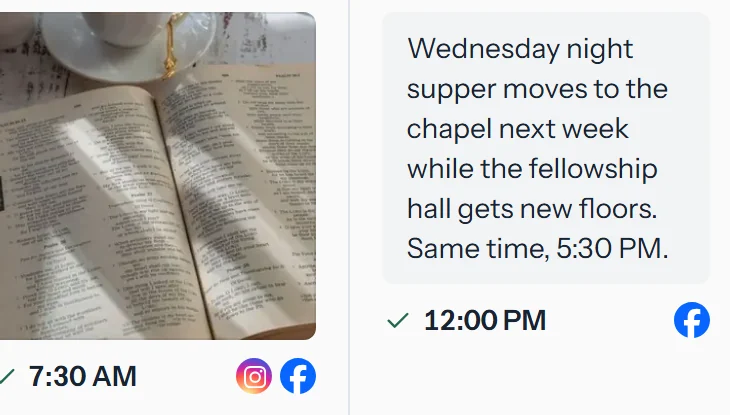
Free app from Church Posting
cOS Social
Schedule the stream link to the church’s Facebook Page, Instagram, YouTube and Google profile from one calendar.
See cOS SocialDoes a church need a license to stream its service?
Yes, for songs under copyright. CCLI’s Church Copyright License covers singing in the room, and its Streaming License is a separate add-on that covers live streams and uploaded recordings of the service.
| License | What it covers |
|---|---|
| Church Copyright License | Projecting song words from a computer, printing them in song or service sheets, and arranging or translating a song with no published version |
| Streaming License | Live streams and uploaded recordings of worship services on the church website or social media, for songs covered by the Church Copyright License |
| Streaming Plus License | Everything in the Streaming License, plus artist tracks, backing tracks and multitracks played during the online service |
From CCLI’s license page, read 22 October 2026. CCLI lists the price of each license on its own site. Ask CCLI whether each song and each recording you stream is covered.
Hymns in the public domain need no license to sing or stream. Church Posting’s hymn library marks which ones are, and our guide to presentation and lyrics software covers the words on the screen.
What should stay off a church live stream?
Keep children, spoken prayer requests and anyone who has not agreed to appear off the stream. Point the cameras at the platform, away from the children’s seats, and ask before a baptism or a testimony goes out.
Ask parents before a child appears on the stream. Mute the stream while people share prayer requests aloud, because a request can name a person’s illness, money troubles or family. Turn down the congregation microphone when the singing ends, so it does not carry private talk. Put a sign at the door that says the service is streamed. For the written policy behind these rules, read the church social media policy.
Who runs the stream when the volunteer is away?
Train a second person and tape a one-page checklist to the desk. Have that person run the stream once a month so the steps stay fresh.
Church Posting’s church management software, from $39 a month by church size

Covenant OS
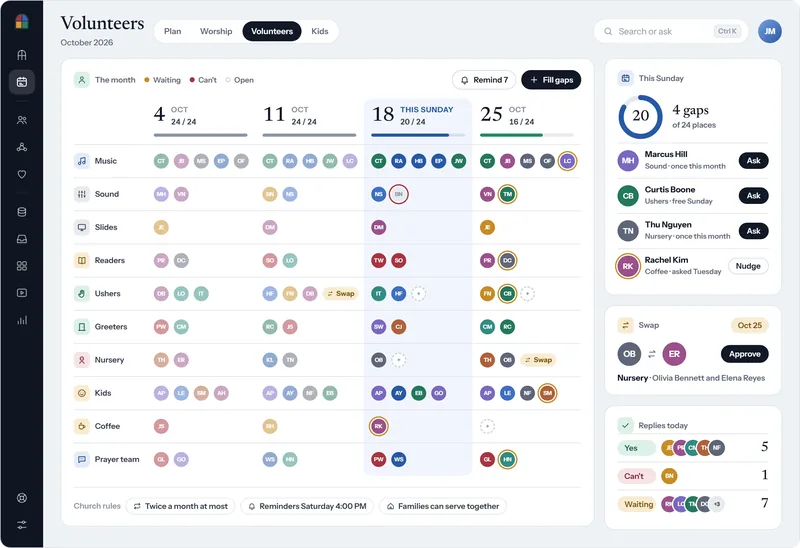
Put the stream volunteer and the backup on the month’s schedule with the sound and slides teams, ask a stand-in when someone can’t serve, and approve the reminders that go out on the church’s schedule, such as Saturday at 4:00 PM.
The Covenant OS volunteer schedule for October, with each Sunday’s team by role, open places, a swap waiting for approval and the replies received today.
See the volunteer scheduleSunday stream, 10:30 AM service
- Camera on and pointed at the pulpit preset
- Computer on the network cable, and the upload test shows at least 16 Mbps
- Sound board stream output up, congregation microphone on
- Headphones on, and the sound is clear
- YouTube open, and the private test stream is live
- At 10:25 press Go Live. At the benediction press End Stream.
- Mute the stream during prayer requests
The free church slides tool also shows hymns, Scripture and announcements full screen from a browser, with an operator window that shows the volunteer the next slide. Pick a hymn and see the first verse as a slide.
Questions people ask
Can a church live stream on YouTube for free?
Yes. YouTube charges nothing to stream. The channel has to be verified and have no live streaming restrictions in the past 90 days, and YouTube says the first stream may need a 24-hour wait after live streaming is turned on (YouTube Help, read 22 October 2026).
Can a church stream a service from a phone?
Yes, with a tripod and an audio adapter from the sound board. YouTube requires at least 50 subscribers before a channel can stream from its mobile app, so a new church channel may need to stream from a computer first.
Does a church need a license to stream its service?
Yes, if the service includes songs under copyright. CCLI's Streaming License is an add-on to its Church Copyright License that covers live streams and uploaded recordings of worship services. Streaming Plus also covers artist tracks, backing tracks and multitracks played during the service. Public domain hymns need no license.
What software do churches use to live stream?
OBS Studio is free and runs on Windows, Mac and Linux. Paid services such as BoxCast and Resi add scheduling, support and their own players, from $99 a month for Resi Social Only and $109 a month for BoxCast Standard billed yearly (read 22 October 2026).
How much does it cost to live stream a church service?
From $0 with a phone the church owns and YouTube, to $1,448.99 for one PTZ camera and a capture device, to $3,143 for two PTZ cameras and a Blackmagic ATEM Mini Pro switcher, at prices read 22 October 2026. A paid streaming service adds $1,188 to $3,588 a year.
Do church live streams make money?
Rarely. A church stream serves members at home, the sick and visitors deciding whether to come. YouTube shares ad revenue only with channels in its Partner Program, which takes 1,000 subscribers and either 4,000 watch hours in the last 12 months or 10 million Shorts views in the last 90 days (YouTube Help, read 22 October 2026). Plan the stream’s cost in the church budget.
Sources
- Get started with live streaming, YouTube Help. Read October 22, 2026.
- Live stream on mobile, YouTube Help. Read October 22, 2026.
- Choose live encoder settings, bitrates, and resolutions, YouTube Help. Read October 22, 2026.
- YouTube Partner Program overview & eligibility, YouTube Help. Read October 22, 2026.
- OBS Studio, OBS Project. Read October 13, 2026.
- Quick Start Guide, OBS Project. Read October 22, 2026.
- Advanced NVENC Options (31.0), OBS Project. Read October 22, 2026.
- BoxCast pricing, BoxCast. Read October 22, 2026.
- Live streaming pricing and plan options overview | Resi, Resi. Read October 22, 2026.
- Church Copyright License, CCLI. Read October 22, 2026.
- ATEM Mini, Blackmagic Design. Read October 22, 2026.
- Cam Link 4K, Elgato. Read October 22, 2026.
- PTZOptics Move SE 20x PTZ Camera, Markertek. Read October 22, 2026.
Church Media Director jobs
Churches have open church media director jobs on Church Posting , including Production Associate at Alliance Christian Fellowship and Millard Production Coordinator at King of Kings Church (Fremont) .
More on software
All software articlesChurch payroll software, priced, and how each one handles a minister's housing allowance
How a minister's housing allowance works under IRS Publication 517: the three limits on it, the designation a church makes in advance, Social Security and Medicare tax, and the pastor's W-2.
QuickBooks for Churches: Setup, Funds and 2026 Prices
Set up QuickBooks Online for a church: which plan tracks funds, the $80 TechSoup price, class setup and a free chart of accounts to import.
Church accounting software that keeps each fund separate, with 2026 prices
What fund accounting is, prices read October 22, 2026 for Aplos, ChurchPro, PowerChurch, ChurchTrac, IconCMO, QuickBooks Online, Wave and Xero, and the IRS rules a church treasurer has to meet.
The weekly email
New free tools, guides and jobs, in one email on Sundays.