

Church Presentation Software: Free and Paid, 2026 Prices
Compare ProPresenter, EasyWorship, Proclaim, MediaShout and free FreeShow, OpenLP and WorshipTools, with prices read October 22, 2026 and the CCLI rules.
What changed on October 22, 2026: Rewrote the guide with ProPresenter, EasyWorship, Proclaim, MediaShout and the free programs priced on October 22, and the CCLI rules for projecting lyrics.
Short answer
Most churches of 100 to 300 people run lyrics well on a free program. FreeShow and OpenLP are free with a stage view and a phone remote, and WorshipTools Presenter is free until you need those two. If you want a paid program with phone support, EasyWorship starts at $210 a year and ProPresenter costs $289 a year per computer. Whichever you choose, the church needs a CCLI license to project songs still under copyright.
- FreeShow and OpenLP, with a stage view and a phone remote included
- $0
- ProPresenter for one computer, the most common paid choice
- $289 a year
- Hymns published that year or earlier are public domain in the US and need no license
- 1930
Every price here was read off the vendor's own page on October 22, 2026.
On this page
- What is the best presentation software for a church?
- How much does church presentation software cost?
- What is the best free church presentation software?
- What does a Sunday look like with presentation software?
- Does a church need a license to project song lyrics?
- Which program fits Riverside?
- Questions people ask
Church presentation software puts the song lyrics, Scripture and announcements on the screens in the sanctuary while a volunteer moves the slides along with the service. Every example below uses Riverside Community Church in Cedar Falls, Iowa, a sample church with one sanctuary computer, a stage screen for the singers and a volunteer who builds Sunday at home.
What is the best presentation software for a church?
For most churches of 100 to 300 people, a free program does the job. Pay for ProPresenter or EasyWorship when you need phone support, lighting control or several screens running different content.
| Price | Computers covered | Runs on | Free trial | |
|---|---|---|---|---|
| FreeShow | Free | Any number | Windows, Mac, Linux | Not needed |
| OpenLP | Free | Any number | Windows 10+, macOS 10.15+, Linux | Not needed |
| WorshipTools Presenter | Free; stage display, remote and extra screens cost more | Unlimited installs | Windows, Mac | Not needed |
| EasyWorship | From $210 a year | Every computer at one location | Windows, Mac | 30 days, no card |
| Proclaim | $269.99 a year | Unlimited | Windows, Mac | 14 days, no card |
| ProPresenter | $289 a year per computer | One per seat | Windows, Mac | 14 days |
| MediaShout 7 | $599 once (Mac $499) | One location | Windows or Mac | 14 days, no card |
| cOS Presenter (ours) | Free | Any computer with a browser | A browser, Windows, Mac | Not needed |
Prices read on each company's own page on 22 October 2026. EasyWorship's price rises with average weekly attendance. Proclaim's $399.99 and $999.99 plans add media. ProPresenter quotes 11 or more seats through its sales team.
ProPresenter runs lighting cues, several screens and a livestream output from one computer. A church of Riverside’s size uses a fraction of that and pays $289 a year for each computer that runs a service. ProPresenter lets a volunteer edit and build shows on a computer without an active seat, so building Sunday at home costs nothing extra.
How much does church presentation software cost?
From nothing to $289 a year for one sanctuary computer, or $599 once for MediaShout. The free programs cost nothing in any year.
Count the computers before you compare. ProPresenter charges for each one that runs a service, so a church that also runs a lobby screen from a second computer pays $578 a year. EasyWorship covers every computer at one location, and Proclaim covers any number.
What is the best free church presentation software?
FreeShow, for most churches. It is free and open source, looks lyrics up by song title, and includes a stage view for the singers and a phone remote for the worship leader.
| FreeShow Most churches | OpenLP | WorshipTools Presenter | Church slides | |
|---|---|---|---|---|
| Cost | Free | Free | Free; add-ons paid | Free |
| Install | Windows, Mac, Linux | Windows, Mac, Linux, FreeBSD | Windows, Mac | None, runs in a browser |
| Stage view for singers | Yes | Yes, on any device on the network | Paid upgrade | One screen only |
| Phone remote | Yes | Yes, from a phone browser or app | Paid upgrade | Keyboard on the presenting computer |
| Scripture | Look up a passage, one click to slides | Import translations, search by reference or phrase | Built-in Bibles | Bible passages |
| Best fit | A modern look with one volunteer | Older computers or Linux | A church already on WorshipTools | A guest speaker or a one-off service |
From freeshow.app, openlp.org and worshiptools.com, read 22 October 2026. OpenLP's current release is 3.1.7.
Free programs rely on volunteers for support, so run one through a month of rehearsals before Sunday depends on it. Keep the old program installed until the new one has carried four Sundays without trouble.
Free app from Church Posting
cOS Presenter
Run lyrics, Scripture and announcements on the projector, the singers’ stage screen and the stream from one operator screen, with a phone as the remote.
See cOS PresenterFor a guest preacher, a funeral or a service in the fellowship hall, the free church slides tool builds hymn, Scripture and announcement slides in the browser and downloads them as PowerPoint. Pick a hymn below and the first verse appears as a slide.
What does a Sunday look like with presentation software?
A volunteer builds the service at home midweek and runs it from the sanctuary computer on Sunday, with the singers reading a stage screen. The credits slide with the CCLI number ends each song.
- Thursday Song listKeys The worship leader sends five songs and the order of service.
- Thursday night Build at home The volunteer builds the slides on a laptop and syncs them to the sanctuary computer.
- Sunday 8:30 Run-through One pass through every song with the band, fixing typos on the spot.
- During the service Stage viewRemote The singers read the next line on the stage screen. A repeated chorus is one key.
- End of each song CCLI number Title, writers, copyright line and the church license number.
The four tests for any program: the volunteer sees the next slide, a chorus can repeat on the spot, a Bible passage appears by typing its reference, and next Sunday can be built at home.
Church Posting’s church management software, from $39 a month by church size

Covenant OS
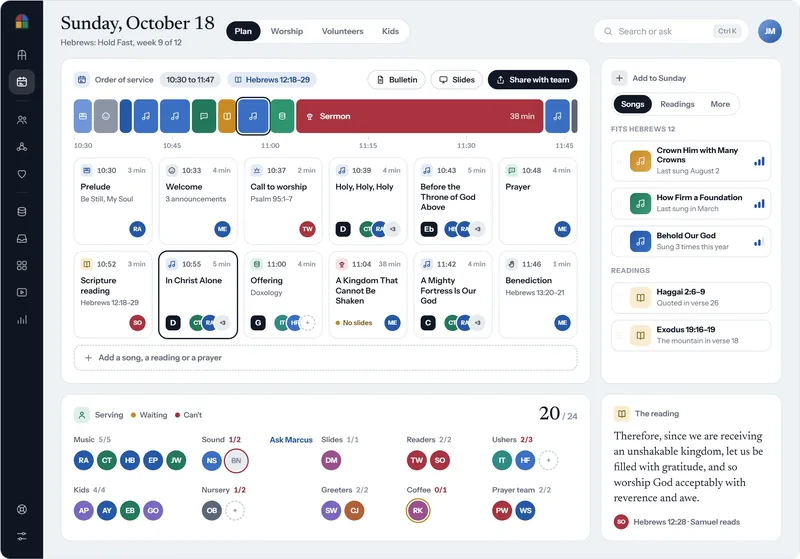
Plan Sunday’s order of service with each song and reading in its place, then make the slides and the bulletin from that same plan.
Sunday’s order of service in Covenant OS, with each song, reading and the sermon on a timeline, Bulletin and Slides buttons, and who is serving on each team.
See Sunday planningKeep the slides plain. Use large type, four lines at most, and a background dark or light enough to read from the back row. For the people who read better from paper, print the same hymns as a booklet.
Free tool from Church Posting
Song sheet maker
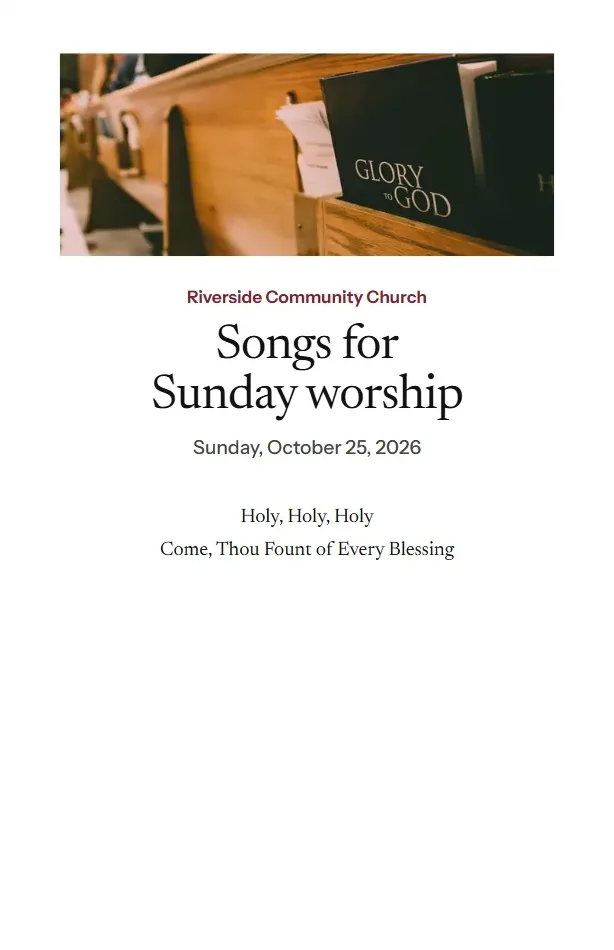
Pick public domain hymns, choose the stanzas and print the words as a folded booklet, in standard or large print.
Make a song sheetDoes a church need a license to project song lyrics?
For songs still under copyright, yes, and most churches buy it from CCLI. Hymns published in 1930 or earlier are public domain in the United States and need no license.
| What the church does | What covers it |
|---|---|
| Projects lyrics from a computer | CCLI Church Copyright License |
| Prints lyrics in the bulletin or a song sheet | CCLI Church Copyright License |
| Livestreams or posts the service with live music | CCLI Streaming License, added to the copyright license |
| Streams with recorded tracks, backing tracks or multitracks | CCLI Streaming Plus License |
| Projects a hymn published in 1930 or earlier | Nothing; the words are public domain in the US |
From CCLI's US license page and Duke's Public Domain Day 2026 list. CCLI prices each license by the church's attendance through a calculator on its site.
When the worship leader asks for “the one that goes like this” and nobody remembers the title, hum it.
Free tool from Church Posting
Find a hymn by humming
Hum the first line of a tune in any key, and the tool shows which public domain hymn it matches. Nothing is recorded or sent.
Hum a tuneCopy public domain hymn words from an older source, because a modern hymnal may print an edited text or a new translation with its own copyright. The hymn library holds public domain texts you can print or project. Put each song’s title, writers, copyright line and your church’s CCLI license number on its last slide.
Holy, Holy, Holy
Words: Reginald Heber, 1826
Public domain in the United States
Which program fits Riverside?
FreeShow. Riverside has one sanctuary computer, a stage screen, one volunteer who builds Sunday at home and no lighting to control, which is the case the free programs handle well.
A church with a production team, timed lighting cues or three different screens should trial ProPresenter for 14 days, and a church that wants a phone number to call on Sunday morning should trial EasyWorship for 30. Church Posting’s free cOS Presenter runs lyrics, Scripture and every screen in the room, and covenantos.com/presenter shows how it works.
Questions people ask
What is the best presentation software for a church?
For a church of 100 to 300 people with one sanctuary computer, start with a free program. FreeShow suits a church that wants a modern look and a phone remote, and OpenLP suits a church with older computers or Linux. Choose ProPresenter ($289 a year per computer) when the church runs lighting, several screens or a livestream from the same computer, and EasyWorship (from $210 a year) when the volunteers want phone support.
Is ProPresenter free for churches?
No. ProPresenter costs $29 a month or $289 a year for each computer that runs a service, read on Renewed Vision's page on 22 October 2026. A 14-day trial is free, and a volunteer can build next Sunday's slides on a home computer without paying for a second seat.
Is there a free alternative to ProPresenter?
Yes. FreeShow and OpenLP are free and open source, and both include a stage view for the singers and a remote you run from a phone. WorshipTools Presenter is free on Mac and Windows, and its stage display, phone remote and extra screens are paid upgrades.
Can I use EasyWorship for free?
Only for a 30-day trial with full access and no credit card. After that, EasyWorship's Basic plan starts at $210 a year and Premium at $330 a year, and the price rises with your average weekly attendance.
Is WorshipTools Presenter free?
Yes. WorshipTools says Presenter is free forever on Mac and Windows with unlimited installs and no expiring trial. You pay only to add the stage display, the phone remote or more than one output screen.
What is the difference between FreeShow and OpenLP?
Both are free and open source and both show songs and Scripture with a stage view and a phone remote. FreeShow has the newer interface and looks up lyrics by song title, and OpenLP has run in churches longer, imports songs from many older programs and supports Windows 10, macOS 10.15 and Linux.
Does a church need a license to put song lyrics on a screen?
For any song still under copyright, yes. The CCLI Church Copyright License covers projecting lyrics from a computer and printing them in the bulletin. Hymns published in 1930 or earlier are public domain in the United States, so the church can project their words without a license.
Can a church use PowerPoint or Google Slides for worship?
Yes, and many small churches do. The trouble starts when the worship leader repeats a chorus, because a slide deck plays in one order, and worship software lets the volunteer jump to any verse or chorus with one key.
Sources
- ProPresenter, Renewed Vision. Read October 22, 2026.
- EasyWorship pricing, EasyWorship. Read October 22, 2026.
- Pricing | Proclaim Presentation Software, Faithlife. Read October 22, 2026.
- Church Presentation Software Pricing | MediaShout, MediaShout. Read October 22, 2026.
- Presenter by WorshipTools, WorshipTools. Read October 22, 2026.
- FreeShow, a free and open-source presenter, FreeShow. Read October 22, 2026.
- ChurchApps/FreeShow, GitHub. Read October 13, 2026.
- OpenLP, free open source church worship presentation software, OpenLP. Read October 22, 2026.
- Church Copyright License [US], CCLI. Read October 22, 2026.
- Public Domain Day 2026, Duke University Center for the Study of the Public Domain. Read October 12, 2026.
Church Sound Technician jobs
Churches have open church sound technician jobs on Church Posting , including Windsor Technical Director at Foundations Church and Production Audio Engineer at Hopewell Baptist Church .
More on software
All software articlesChurch payroll software, priced, and how each one handles a minister's housing allowance
How a minister's housing allowance works under IRS Publication 517: the three limits on it, the designation a church makes in advance, Social Security and Medicare tax, and the pastor's W-2.
QuickBooks for Churches: Setup, Funds and 2026 Prices
Set up QuickBooks Online for a church: which plan tracks funds, the $80 TechSoup price, class setup and a free chart of accounts to import.
Church accounting software that keeps each fund separate, with 2026 prices
What fund accounting is, prices read October 22, 2026 for Aplos, ChurchPro, PowerChurch, ChurchTrac, IconCMO, QuickBooks Online, Wave and Xero, and the IRS rules a church treasurer has to meet.
The weekly email
New free tools, guides and jobs, in one email on Sundays.