


Church Directory Software: Apps, Prices and a Free Maker
Make a church photo directory: what each entry shows, a consent form, who gets a copy, a free maker, and app prices read October 22, 2026.
What changed on October 23, 2026: Replaced the free directory answers with the free directory maker and the priced church software, and kept the dated price table.
Short answer
Most churches of 100 to 300 people keep one directory in two forms, a printed booklet and an app behind a sign-in. Church Posting's directory maker prints the booklet free, Instant Church Directory costs $99.80 a year, and Breeze includes a directory at $72 a month. Covenant OS (ours) keeps the directory on the same screen as each household's giving and care notes, from $39 a month up to 50 people. List only what each household agreed to show.
- Church Posting's directory maker, for a printed booklet or PDF
- $0
- Covenant OS (ours) for household records, up to 50 people
- $39 a month
- A year of Instant Church Directory Standard, for any size of church
- $99.80
Every price here was read off the vendor's own page on October 22, 2026.
On this page
- What should a church directory include?
- How do I make a church photo directory?
- What does church directory software cost?
- Is there a free church directory app?
- How do I get each household’s consent?
- Who should get a copy of the church directory?
- When should a household be left out of the directory?
- What should I ask before buying a directory app?
- Questions people ask
A church directory lists each household’s names, address, phone number and email, often with a family photo, so members can reach one another. Every example below uses Riverside Community Church in Cedar Falls, Iowa, a sample church of about 200 people that prints a booklet each fall and keeps an app the rest of the year.
What should a church directory include?
Print names, a phone number and an email for every household that agreed, and add a family photo and an address for the households that want them. Leave out birth years, giving, health and prayer notes, and any household that asked to be left out.
| Field | Put it in? | How to print it |
|---|---|---|
| Last name, then the adults’ first names | Yes | The names the household goes by |
| Children’s first names | With a parent’s consent | No ages, birth dates or schools |
| Home address | With consent | Some households want a phone number only |
| Phone number | With consent | Ask which number to print |
| With consent | One address for the household | |
| Family photo | With consent of each adult and the children’s parents | A photo the family has seen |
| Adults’ birthdays and anniversary | With consent | Month and day, without the year |
Add one page at the front for the pastors, elders, deacons and staff, with the church office’s phone number and email.
Hansen, Mark and Julie
Ava and Eli
412 Walnut Street, Cedar Falls, Iowa
319-555-0142
How do I make a church photo directory?
Collect a consent form from every household, gather the photos, put one household to a row in a spreadsheet, and lay it out in a directory maker. Riverside’s office does the whole job in five steps each September.
- Consent forms Handed out two Sundays in a row. A household with no form stays out.
- Photos Families send their own, or volunteers take headshots after the service.
- Spreadsheet One household a row Only the fields each household marked yes.
- Layout Directory maker Photo directory or plain list, letter pages or booklet.
- Printed copies For members only, with the old copies collected or shredded.
The office keeps the signed forms in a locked drawer until the next year’s forms come in.
Church Posting’s free directory maker takes the spreadsheet and the photos and lays out the pages. It prints letter pages or a booklet folded in the middle, you can open any household to edit it or leave it out, and the names, addresses and photos stay on your computer. Type one family below and the entry appears; open the tool and that family is already at the top of your list.
Free tool you can try here
Make a directory page
Type one family and see its entry. The real tool opens with that family at the top of your list.
This free tool is made by Church Posting.
Riverside Community Church
Church directory
Brooks
Michael and Hannah
Ella, Sam
(417) 555-0191
The maker is free and keeps your list and photos in your browser.
What does church directory software cost?
Church Posting’s directory maker costs nothing for a printed copy, and Planning Center People costs nothing at any size. Instant Church Directory costs $99.80 to $154.88 a year, and Breeze includes a directory in its $72-a-month church management software. Covenant OS (ours) starts at $39 a month up to 50 people and goes to $399 a month for 1,001 to 3,000, with every part of the plan included.
| Service | What it does | Price |
|---|---|---|
| Planning Center People | Membership database with a church-wide directory in the Church Center app, where members update their own profiles | $0 for every church |
| Instant Church Directory, Standard | Directory for print as a PDF, plus a member app and a members’ website | $9.99 a month or $99.80 a year |
| Instant Church Directory, Premium | Standard plus your own logo, colors and tab labels | $14.99 a month or $154.88 a year |
| Breeze | Church management software with a member directory and app | $72 a month, no setup fee |
| Church Posting directory maker | Prints a photo directory or list from a spreadsheet | $0 |
| Covenant OS (ours) | Church management software that keeps each household on one page, with the directory beside the household’s serving, giving and care notes | $39 to $399 a month by average weekly attendance, from $699 above 3,000 |
Prices read on each company’s own page on 22 October 2026. Instant Church Directory and Breeze charge one price at any church size.
If your church already uses church management software, look for the directory in it before you buy a second product. Our guide to church management software prices and free options compares the systems and covers the ones with a free plan.
Is there a free church directory app?
Yes. Church Posting’s directory maker prints a booklet or a plain list from your own spreadsheet at no cost, and the names and photos stay on your computer. Instant Church Directory’s member apps are free to members once the church pays for a subscription. If the directory should update itself, put it in the church software the church already pays for, and Covenant OS (ours) keeps each household’s people, serving, giving and care notes on one page, from $39 a month up to 50 people.
How do I get each household’s consent?
Ask every household once a year on a signed form, and keep the forms. A household may change its answer at any time, and a household that returns no form stays out until someone asks them.
| Part | Wording |
|---|---|
| Opening | Please list our household in the Riverside Community Church directory. We understand the directory goes to members of the church and to no one else. |
| What to show | Address, phone, email, children’s first names, photo, and the adults’ birthdays and anniversary by month and day, each with a box for yes and a box for no |
| Leaving out | Leave our household out of the directory. |
| Signatures | The name and signature of each adult in the household, and the date |
A line left blank counts as no.
The form asks about names, address, phone, email, a photo and children’s first names. Add a line for birthdays if your directory prints them. To set the same choices in an app, use the directory permissions matrix, a spreadsheet of which field each audience sees.
Free tool from Church Posting
Church bulletin maker
Put the request in the bulletin announcements on the two Sundays the forms go out, with the date the office needs them back.
Make a bulletinWho should get a copy of the church directory?
Give it to members and to no one else. Print “For members of Riverside Community Church only” on the cover with your own church’s name, keep the file off the public website, and put any app behind a sign-in the church office approves.
- Hand printed copies to members, and to no one outside the church.
- Send the PDF by email only to a member who asks.
- Put an online or app directory behind a sign-in the office approves.
- Collect or shred old copies when the new one comes out.
The church office holds more about each household than the directory shows. If your records are in software, set who sees each kind of record there.
| Record | Members | Group leaders | Staff |
|---|---|---|---|
| Names | Yes | Yes | Yes |
| Phone and email | If the household agreed | For their own group | Yes |
| Home address | If the household agreed | If the household agreed | Yes |
| Children’s names | If the parents agreed | For children in their own class | Yes |
| Birth dates, notes and giving | No | No | Only the staff who need them |
A household’s consent covers what members see. Group leaders and staff use the other details for the church’s work, such as calling a family or checking a child in, and pass them to no one.
When should a household be left out of the directory?
When a member tells the office about a protective order, a custody dispute or a person looking for them. Leave that whole household out of every copy, printed and online, and leave no gap that shows a name was removed.
Keep their record in the office with a note only staff can read, and tell whoever prints the directory and whoever runs the church’s app. Check the list of left-out households again before each printing. Removing an entry does nothing about copies already handed out, so tell the household which earlier directories listed them and ask members to return or shred those copies.
What should I ask before buying a directory app?
Five questions, and a product that fails any of them puts a household at risk or traps your records.
| Question | Why it matters |
|---|---|
| Can each household choose which fields show? | Consent differs from one household to the next |
| Can the office hide a household completely? | A household at risk has to disappear from every screen |
| Is the directory behind a sign-in the office approves? | A link anyone can open is a public directory |
| Can a member download the whole list? | A downloaded list leaves the church’s control |
| Can you export every record? | You will need the records if you change software |
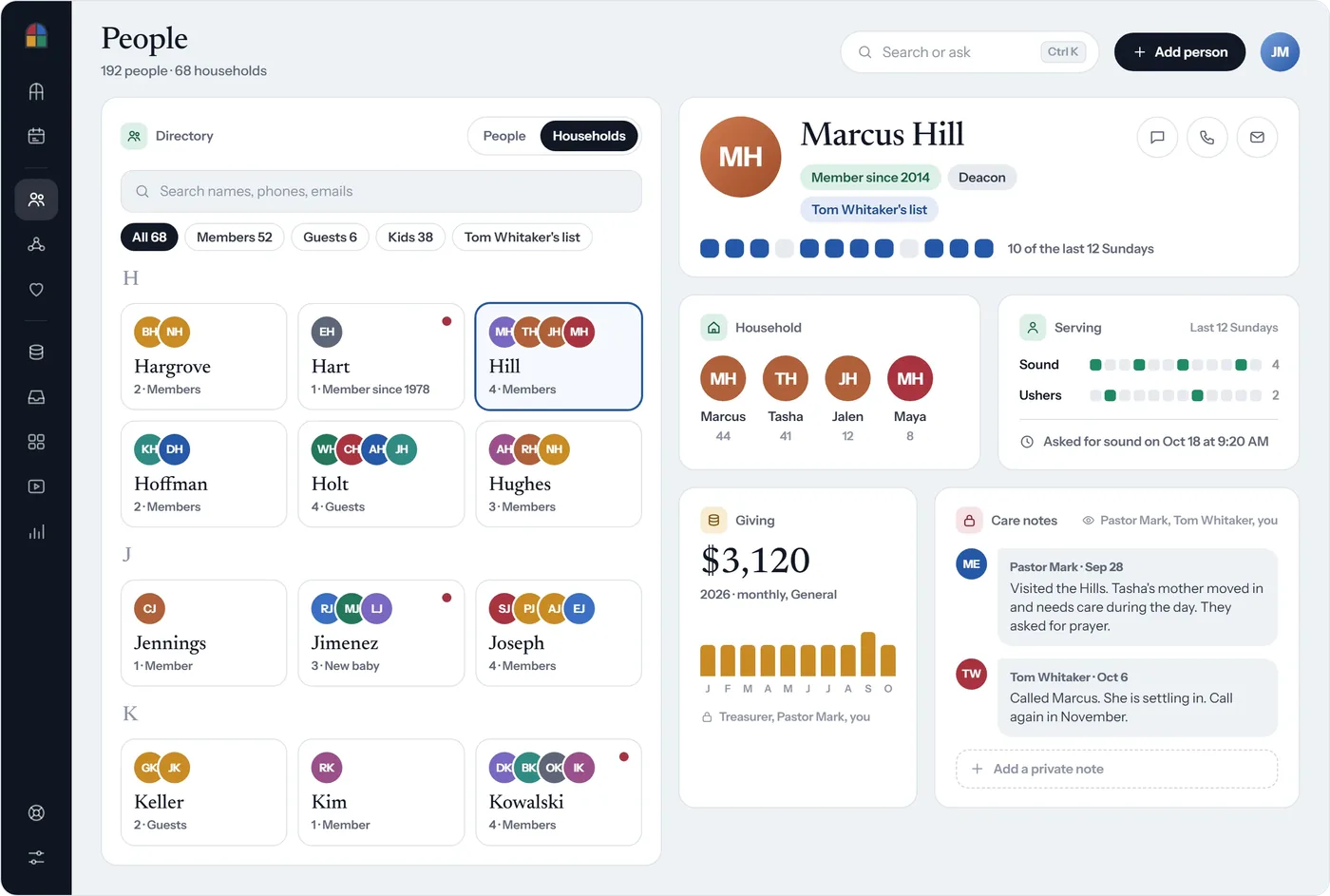
For the rest of what the office holds, from giving records to counseling notes, read protecting member data.
Questions people ask
Is there a free church directory app?
Yes. Church Posting's free directory maker prints a directory from your own spreadsheet at no cost, and Instant Church Directory's member apps are free to members once the church pays for a subscription. A church that wants the directory to keep itself up inside its church software pays for that software, and Covenant OS (ours) holds households, guests, care notes and prayer on one page per family, from $39 a month up to 50 people.
Is Instant Church Directory free?
No. It has a 30-day free trial, then costs $9.99 a month or $99.80 a year for Standard and $14.99 a month or $154.88 a year for Premium, at one price for any size of church (Instant Church Directory, read 22 October 2026). The membership renews on its own after the trial unless you cancel.
How do I make a church photo directory for free?
Put one household to a row in a spreadsheet, collect family photos from the households that agreed to show one, and open both in Church Posting's free directory maker. It lays out a photo directory or a plain list and prints letter pages or a folded booklet, and the names and photos stay on your computer.
Should children be in a church directory?
Print children's first names only, and only when a parent has signed for it. Leave out ages, birth dates and schools, and leave the whole household out when a parent asks.
Can a church put its directory on the public website?
No. A directory on an open web page can be copied by anyone. Keep it in an app or a members' site that asks for a sign-in the church office approves, and hand printed copies only to members.
How often should a church update its directory?
Keep the app current all year, since members can update their own entries. Print a new booklet once a year, ask every household to renew its consent form at the same time, and collect or shred the old copies.
Do churches still print directories?
Many do, because older members read a booklet and newer members use an app. Instant Church Directory offers booklet and letter-size print templates beside its app, and Church Posting's free maker prints a booklet from a spreadsheet.
Sources
- Simple pricing with one low rate no matter your church size. | Instant Church Directory, Instant Church Directory. Read October 22, 2026.
- Instant Church Directory, Instant Church Directory. Read October 22, 2026.
- Planning Center People, Planning Center. Read October 22, 2026.
- Breeze pricing, Breeze. Read October 22, 2026.
- Covenant OS Pricing, Covenant OS. Read October 23, 2026.
Church Secretary jobs
Churches have open church secretary jobs on Church Posting , including Receptionist at Central Chinese Christian Church and Administrative Assistant (Part Time) at Creekside Church .
More on software
All software articlesChurch payroll software, priced, and how each one handles a minister's housing allowance
How a minister's housing allowance works under IRS Publication 517: the three limits on it, the designation a church makes in advance, Social Security and Medicare tax, and the pastor's W-2.
QuickBooks for Churches: Setup, Funds and 2026 Prices
Set up QuickBooks Online for a church: which plan tracks funds, the $80 TechSoup price, class setup and a free chart of accounts to import.
Church accounting software that keeps each fund separate, with 2026 prices
What fund accounting is, prices read October 22, 2026 for Aplos, ChurchPro, PowerChurch, ChurchTrac, IconCMO, QuickBooks Online, Wave and Xero, and the IRS rules a church treasurer has to meet.
The weekly email
New free tools, guides and jobs, in one email on Sundays.